
AI model status widget
Show the people who use your app, bot or plugin whether the AI models behind it are up. Pick up to 6 models, copy one snippet, done. The numbers come from real requests through Ezkielyna API and refresh every few minutes.
Live uptime of the most-used models
| Model | Uptime 7 days | Success 24 h | Requests 7 days |
|---|---|---|---|
| deepseek-v4.1-flash-1017DeepSeek | 99.91% | 99.47% | 48,624 |
| deepseek-v4.1-flashDeepSeek | 99.98% | 100.00% | 39,405 |
| gpt-6-lunaOpenAI | 99.91% | 100.00% | 2,351 |
| deepseek-v4-proDeepSeek | 99.39% | 100.00% | 2,115 |
| gpt-5.6-terraOpenAI | 100.00% | 100.00% | 1,738 |
| gpt-5.6-lunaOpenAI | 99.66% | 100.00% | 1,160 |
| deepseek-v4-flashDeepSeek | 92.69% | 100.00% | 957 |
| gpt-6.1-terraOpenAI | 100.00% | 100.00% | 691 |
| gpt-5.6-solOpenAI | 100.00% | 100.00% | 627 |
| claude-haiku-5-5Anthropic | 99.35% | 100.00% | 615 |
Build your widget
Selected (3/6, up to 6)
Preview
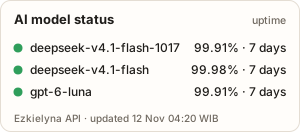
Copy the snippet
<a href="https://ezkielyna.store/models?utm_source=ezk_tools&utm_medium=status_badge&utm_campaign=alat" target="_blank" rel="noopener">
  <img src="https://ezkielyna.store/alat/widget-status/badge.svg?models=deepseek-v4.1-flash-1017,deepseek-v4.1-flash,gpt-6-luna" alt="AI model status on Ezkielyna API" width="300" height="132" loading="lazy">
</a>[](https://ezkielyna.store/models?utm_source=ezk_tools&utm_medium=status_badge_md&utm_campaign=alat)How the widget works
- Uptime = the share of requests in the window that did not fail on Ezkielyna's or the upstream's side (HTTP 5xx), the same rule as the public status page. Client errors such as a wrong key or a bad request do not count against a model.
- The 7-day number is shown when the model had at least 50 requests in 7 days; otherwise the 24-hour success rate is used, and models with too little traffic say so instead of showing a number.
- Data: https://api.ezkielyna.store/status/models.json, aggregates only (no users, keys or IP addresses), written every 10 minutes. The badge and card are cached for up to 5 minutes.
- The image badge is a plain SVG: no JavaScript, no cookies, and it works anywhere an image works, including GitHub READMEs. Our server sees the image request like any web request.
- Green: 99% or higher. Amber: 95–99%. Red: below 95%. Grey: not enough traffic to measure.
Questions people ask
How do I add an AI model status badge to my website or GitHub README?
Pick the models on this page, then copy the HTML snippet (an <img> inside a link) into your site, or the Markdown snippet into README.md. The image is generated live at ezkielyna.store/alat/widget-status/badge.svg with the models in the URL, so there is nothing to install or update.
Where does the uptime number come from?
From real requests through Ezkielyna API: the share that did not fail on Ezkielyna's or the upstream's side (5xx), over 7 days when there were at least 50 requests, else over 24 hours. The raw aggregates are public at api.ezkielyna.store/status/models.json and match the status page.
How often does the widget update?
The data is rewritten every 10 minutes and the badge is cached for up to 5 minutes. GitHub caches README images through its own image proxy, so a README badge can lag a little longer.
Does the status widget track my visitors?
No cookies and no JavaScript. The badge is a plain image and the card is plain HTML; like any image on the web, loading it sends a normal request to ezkielyna.store.
Which models can I show?
Any public model on the Ezkielyna API model list and status page, up to 6 per widget, for example DeepSeek, GLM, Kimi, Qwen, MiniMax, Claude, GPT and Gemini models.
Ringkasan dalam Bahasa Indonesia
Widget status model AI gratis: pasang badge uptime live untuk model DeepSeek, GLM, Kimi, Claude, GPT dan lainnya di website, dokumentasi atau README GitHub. Pilih sampai 6 model, salin snippet HTML atau Markdown. Angka uptime dari request nyata lewat Ezkielyna API (7 hari atau 24 jam), tanpa cookie dan tanpa script. Pilih "Bahasa Indonesia" di atas untuk tampilan lengkap.